
A new update is now available !
A new version of SIMBA is now online: SIMBA 26.10.07.
Please note that you may be prompted to reactivate your license after updating.
A new version of SIMBA is now online: SIMBA 26.10.07.
Please note that you may be prompted to reactivate your license after updating.
SIMBA 26.09 Release is now available. This refinement-focused release adds new machine-control models, improved chart customization, broader Python API coverage, enhanced JMAG co-simulation reliability, and many desktop usability improvements. Download here.
New Models & Modeling
Charts
Python API
JMAG Co-Simulation
Documentation / Desktop UX
Quality of Life
T in the design viewSIMBA Assistant
Stability & Bug Fixes
We are pleased to share new SIMBA examples related to the following:
SIMBA 26.09 Preview is now available. This refinement-focused release adds new machine-control models, improved chart customization, broader Python API coverage, enhanced JMAG co-simulation reliability, and many desktop usability improvements. Download here.
New Models & Modeling
Charts
Python API
JMAG Co-Simulation
Documentation / Desktop UX
SIMBA Assistant
Stability
Join us on May 7, 2026 for a 30-minute webinar introducing SIMBA 26.03 and SIMBA Assistant, the new AI-powered agent for power electronics engineers.
Discover how SIMBA Assistant can help turn requirements into simulation-ready designs, accelerate Python scripting, and extract simulation models from datasheets, directly inside SIMBA.

We are excited to announce that SIMBA for macOS is now available as a Preview release.
This preview gives macOS users early access to SIMBA and allows us to collect feedback before the final release.
You can download SIMBA for macOS here:
Download SIMBA for macOS Preview
As this is a Preview release, your feedback is especially valuable.
For feedback or requests, contact us at support@simba.io.
Welcome to SIMBA 26.03!
This is the biggest SIMBA update ever, with a completely reworked user experience, a chart engine rewritten from scratch, embedded Python directly in SIMBA, FMI-based workflows, and major advances for SPICE, JMAG coupling, and AI-assisted productivity.
Read the full release notes
The fifth preview of the new SIMBA is now available. This preview adds FMU export, chart upgrades, SIMBA Assistant / MCP Server improvements, software update notifications, and more SPICE, memory, and stability work. Download here.
SIMBA Assistant / MCP Server
Charts
XMin/XMax/YMin/YMax)NumberOfBasePeriodsSavedCursors
FMU Export
FMU (Export) model to package a SIMBA design as an FMI 3.0 Co-Simulation FMUBuild FMU...)Settings / Updates
SPICE
Stability / UX
.jsimba project with -open <filepath>
The fourth preview of the new SIMBA is now available. This preview introduces the SIMBA Assistant (with the MCP Server), along with performance gains, stability work (especially around memory), and several UX and chart improvements. Download here.
SIMBA Assistant / MCP Server
Performance
Stability / Memory
Charts
StepHorizontal) so values are held between sample pointsEditing / UX
Annotations
Thermal Data
Compatibility / Models
µ and μ) in expressions/parametersSinusoidalWave to SineWave (with backward-compatible deprecated aliases); updated examples and PSIM mappingJMAG Direct Coupling
The third preview of the new SIMBA is now available. This preview is mostly focused on bug fixes and stability improvements, with a few UX refinements.
Tutorials
Charts
Cursors
Library
Misc
SetThermalImpedanceType / GetThermalImpedanceTypeFixes / Stability
EnumFormatEtc failed)Ctrl+Z) fixed in floating windows
Build a simple buck converter in SIMBA to learn model creation, subcircuits, and libraries.
➡️ https://simba.io/doc/tutorials/models_subcircuits_libraries/
The second preview of the new interface of SIMBA is now available. Here are the main changes.
dt_e; dt_t to specify fixed thermal simulation time step (fallback: base frequency)Fmin > FmaxThe next preview will focus on:
For feedback or feature requests, contact us at support@simba.io.
A quick walkthrough for new users to open a project, navigate the workspace, and run a simulation.
➡️ Watch it here: https://simba.io/doc/tutorials/interface_project_navigation/
SIMBA is getting a major upgrade, and the public beta ships is now available. This isn’t a redesign: we rebuilt SIMBA from the ground up.
What’s new:
SIMBA 25.11 is here!
We're excited to announce the release of SIMBA 25.11, packed with major updates like Non Linear Magnetic Core Model, new power and control models, enhanced SPICE support, and more.
You can now watch the recordings from the SIMBA 2025 Power Electronics Conference on our dedicated page.
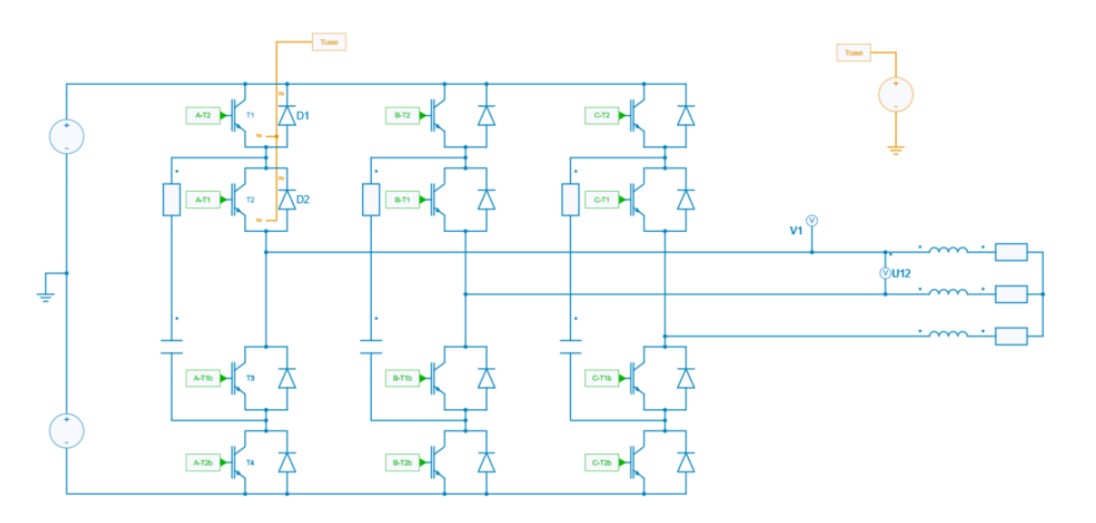
We are pleased to share new SIMBA examples related to the following:
We’re excited to share the preliminary program for the SIMBA 2025 Power Electronics Virtual Conference, happening online November 6, 2025 at 2:00 pm CEST.
Highlights include a keynote from the SIMBA team, and sessions from industry and academia on PFC design, nuclear protection studies, microgrids, and more.
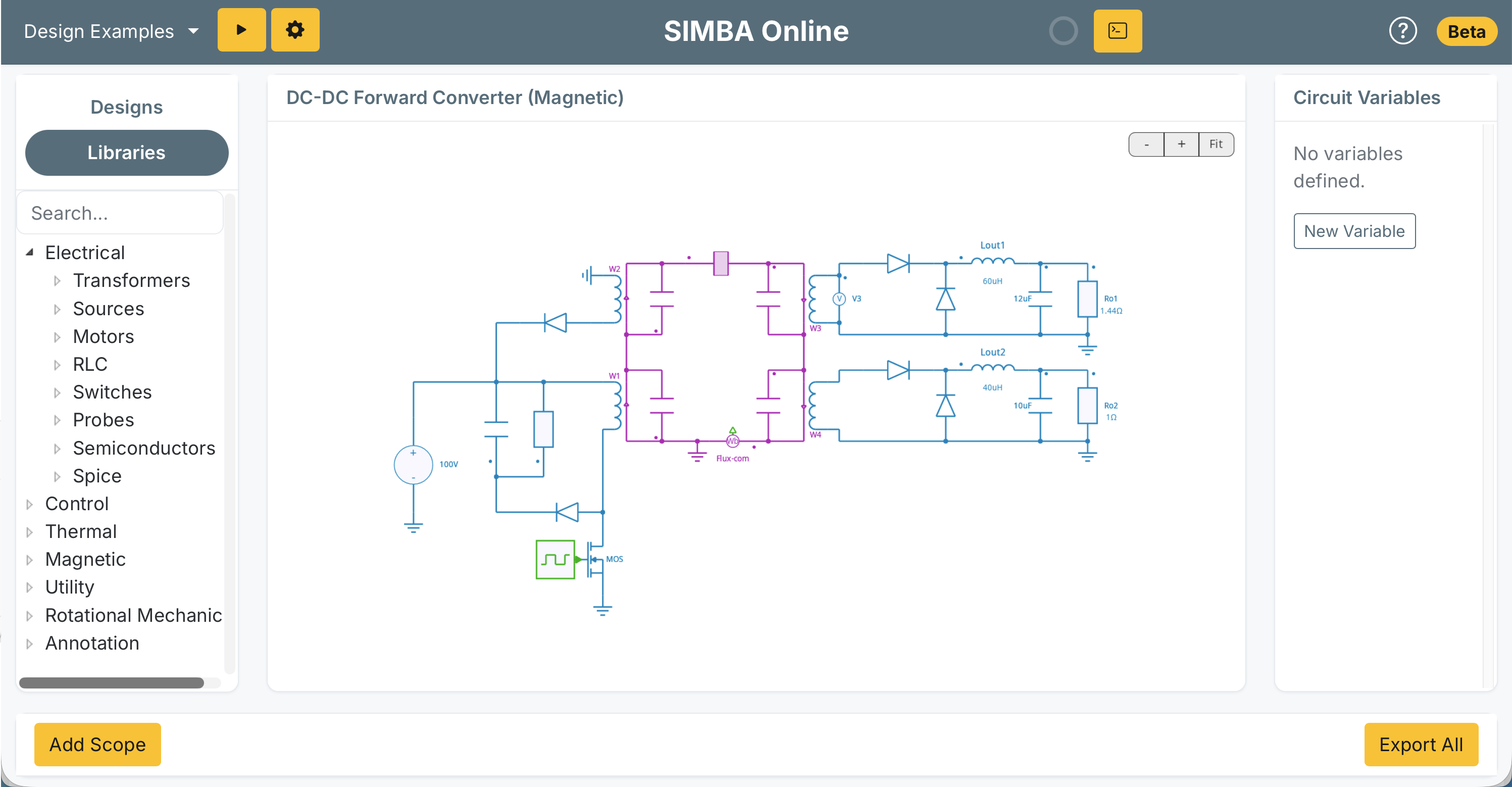
We’re launching a first-of-its-kind platform with SIMBA Cloud and SIMBA Online!
SIMBA Online: a no-install, full-featured browser-based power electronics simulator with a rich model library, intuitive circuit editor, and advanced waveform viewer.
SIMBA Cloud: host your projects in the cloud, access them anywhere, and share securely within your organization, or publish publicly. And with the new VIEWER MODE, anybody can open a public project, even without a license.

SIMBA 25.06 is here!
We're excited to announce the release of SIMBA 25.06, packed with major updates like JMAG Direct Coupling, new GUI features, enhanced SPICE support, and more.
Electric motors and inverters are central to modern electrification, making their optimization crucial for efficiency, sustainability, and performance.
Accurately evaluating losses in both components is a key challenge in motor drive design. This webinar demonstrates how the combined use of SIMBA and JMAG provides fast and accurate solutions to these challenges.
Our team will be in Detroit on June 4–5 for the JMAG Annual Conference.
We'll be showcasing the new direct coupling between SIMBA and JMAG that is perfect for anyone looking to perform detailed simulations combining finite element analysis of motors and magnetics with advanced power electronics and control.
If you're attending, please stop by and say hi!

Our partner Reliamotive Labs will showcase SIMBA at the ECCE Asia 2025 conference (11–14 May 2025, Booth A2).
We demonstrated the new features of SIMBA 25.03 , including accelerated Dual-Stage Electro-Thermal Simulation, in a webinar.

SIMBA 25.03 Release!
One of the major features of SIMBA 25.03 is the new Dual-Stage Electro- Thermal Analysis, which speeds up electrothermal simulation by up to 20 times!

We are thrilled to announce that Reliamotive Labs is now our official distributor for SIMBA in India!
Reliamotive Labs has a strong background in power electronics and a deep understanding of the industry's challenges and needs. With their expertise, we are confident that Indian engineers and researchers will benefit from top-notch local support and a seamless experience with SIMBA.
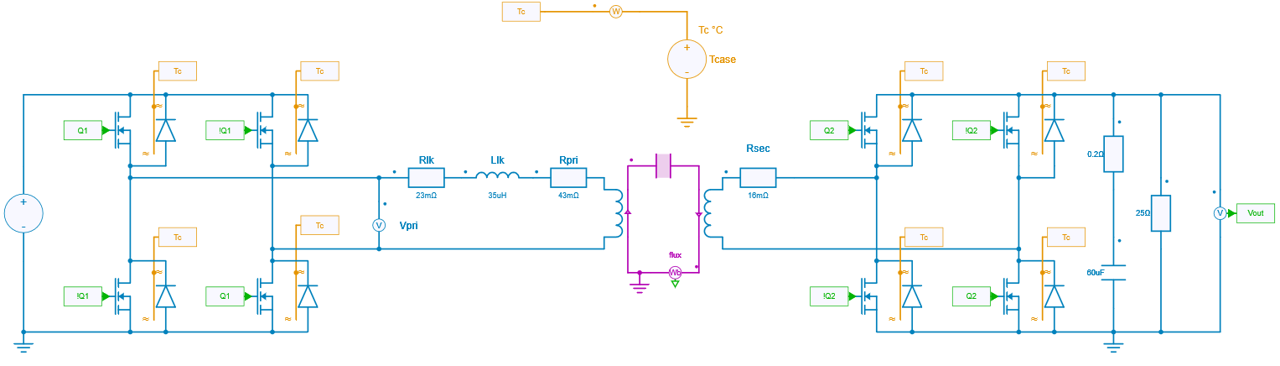
We released a new application example exploring the Dual Active Bridge (DAB) Converter: Loss Evaluation in a Dual Active Bridge (DAB) Converter
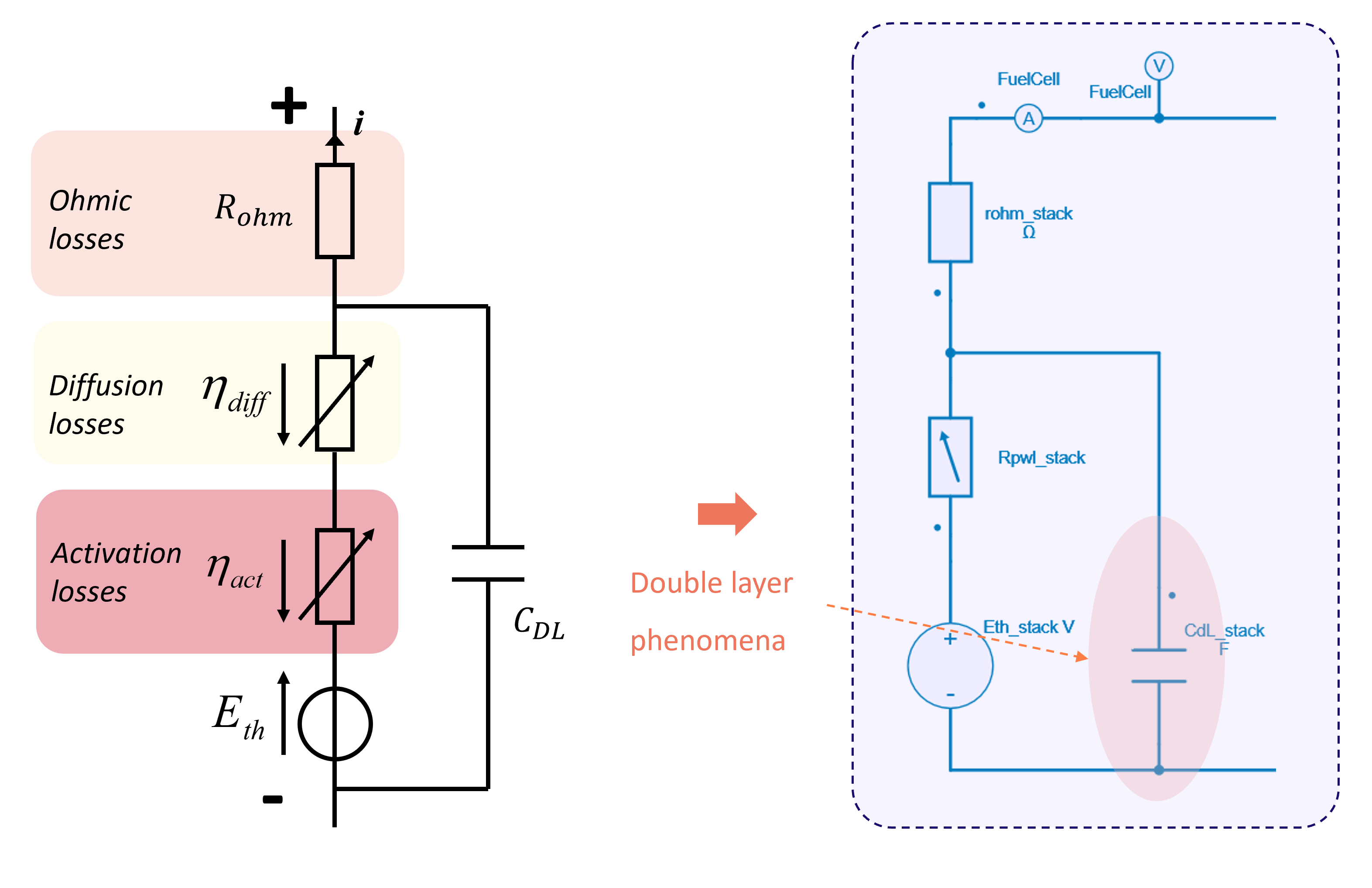
A comprehensive modeling guide for fuel cells has been published on the SIMBA resources platform: Fuel Cell Modeling: implementations and parameter extraction from experimental data.


© Copyright 2019-2026 – AESIM.tech | Privacy policy